
Enterprise data analytics has never been more critical for business operations. Splunk Enterprise 10.0 stands as the industry-leading platform for machine data analysis, offering unparalleled insights into system performance, security events, and business intelligence. AlmaLinux 10, the robust enterprise-grade Linux distribution, provides the perfect foundation for Splunk deployments with its Red Hat Enterprise Linux compatibility and rock-solid stability.
This comprehensive guide walks through every aspect of installing Splunk Enterprise on AlmaLinux 10, from initial system preparation to production-ready configuration. Whether deploying for security operations centers, IT infrastructure monitoring, or business analytics, this installation methodology ensures optimal performance and security.
Prerequisites and System Requirements
Hardware Requirements
Successful Splunk Enterprise deployment begins with proper hardware planning. The minimum specifications include 8 CPU cores, 12GB RAM, and 250GB storage space for basic installations. However, production environments demand significantly more resources to handle enterprise-scale data ingestion and processing.
Recommended production specifications encompass 12 or more CPU cores, 24GB or higher RAM allocation, and 500GB minimum storage capacity. High-performance deployments benefit from NVMe SSD storage arrays and 10GB network interfaces. Memory requirements scale directly with data volume and concurrent user sessions.
Storage considerations extend beyond capacity to include IOPS performance. Splunk’s indexing process generates intensive disk I/O operations, making fast storage subsystems essential for optimal performance. RAID configurations provide both performance improvements and data protection for critical enterprise deployments.
Network bandwidth planning requires careful consideration of data ingestion rates and user access patterns. Gigabit network connections represent the absolute minimum, while 10GB or higher connections support heavy data ingestion workloads effectively.
Software Requirements
AlmaLinux 10 compatibility with Splunk Enterprise 10.0 requires specific kernel versions and system libraries. The Linux kernel version 3.x or higher provides necessary system calls and security features. AlmaLinux 10’s modern kernel exceeds these requirements substantially.
Essential system packages include glibc, openssl libraries, and various development tools. Most AlmaLinux 10 installations include these components by default. Additional dependencies may include curl, wget, and tar utilities for installation procedures.
User account preparation involves creating a dedicated splunk user account for security isolation. Running Splunk services as root creates unnecessary security risks and violates enterprise security best practices. The splunk user requires specific permissions for service operations and file system access.
System clock synchronization through NTP services ensures accurate log timestamping and correlation across distributed environments. Chronyd or ntpd services provide reliable time synchronization capabilities essential for enterprise deployments.
Pre-Installation Planning
Security considerations form the foundation of enterprise Splunk deployments. Network segmentation isolates Splunk infrastructure from general user networks while maintaining necessary connectivity for data sources and administrative access. Firewall rules restrict access to essential ports only.
Port planning encompasses multiple service endpoints. The web interface operates on port 8000 by default, management services use port 8089, and forwarder communications utilize port 9997. Custom port assignments provide additional security through obscurity while avoiding conflicts with existing services.
Directory structure planning establishes consistent deployment patterns across multiple systems. The standard /opt/splunk installation directory provides adequate permissions and follows Linux filesystem hierarchy standards. Custom locations require careful permission management and path configuration.
Backup and recovery strategy development addresses both configuration and data protection requirements. Regular configuration backups protect against system failures and configuration errors. Data backup strategies depend on retention requirements and recovery time objectives.
Downloading Splunk Enterprise
Splunk’s official download portal provides authenticated access to enterprise software packages. Registration requirements include valid email addresses and organizational information for license compliance tracking. Free trial licenses support initial deployments and testing scenarios.
Package selection focuses on the Linux tar.gz format for maximum compatibility and deployment flexibility. This format works across all Linux distributions and provides complete control over installation directories and user assignments. RPM packages offer simplified installation but reduce configuration flexibility.
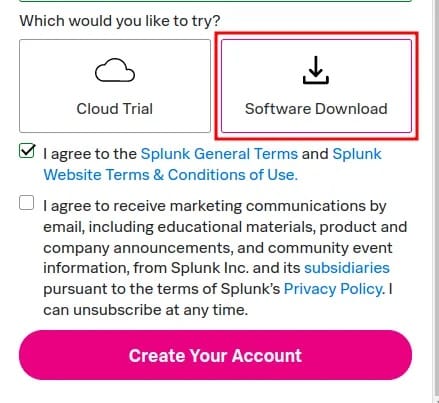
Download verification through checksums ensures package integrity and authenticity. SHA-256 hash verification prevents corrupted downloads and potential security compromises. Official Splunk documentation provides current checksum values for verification purposes.
License considerations differentiate between trial and enterprise deployments. Trial licenses support 60-day evaluations with 500MB daily indexing limits. Enterprise licenses remove these restrictions and provide commercial support services.
Step-by-Step Installation Process
Creating the Splunk User Account
Security best practices mandate dedicated service accounts for application services. Creating the splunk user isolates service operations from system administration activities while providing necessary permissions for normal operations.
sudo useradd -r -m -s /bin/bash splunk
sudo groupadd splunk
sudo usermod -a -G splunk splunk
The -r flag creates a system user account with appropriate UID ranges. Home directory creation through -m provides personal space for configuration files and temporary storage. Bash shell assignment enables interactive troubleshooting when necessary.
Password policy enforcement requires strong authentication mechanisms. Consider implementing SSH key authentication instead of password-based access for enhanced security. Sudo access configuration should follow least-privilege principles for administrative tasks.
Extracting and Installing Splunk
Package extraction to the /opt directory follows standard Linux application deployment patterns. This location provides appropriate permissions and avoids conflicts with system packages or user applications.
cd /tmp
tar xzf splunk-10.0.0-*-linux-x86_64.tgz -C /opt
sudo chown -R splunk:splunk /opt/splunk
Ownership assignment ensures the splunk user maintains complete control over installation files and runtime directories. Recursive ownership changes apply to all subdirectories and files within the Splunk installation.
Permission verification confirms appropriate access controls:
ls -la /opt/splunk
sudo -u splunk ls -la /opt/splunk/bin
Directory structure inspection reveals the complete Splunk installation layout. The bin directory contains executable files, etc holds configuration files, and var stores runtime data and logs.
Initial Splunk Configuration
First-time startup procedures initialize database structures and create default configuration files. The splunk user must execute these commands to maintain proper ownership throughout the process.
sudo -u splunk /opt/splunk/bin/splunk start --accept-licenseLicense acceptance occurs during initial startup through command-line flags or interactive prompts. The --accept-license parameter streamlines automated deployments by accepting license terms automatically.
Administrator account creation establishes initial access credentials for web interface management. Password requirements include minimum length, complexity, and uniqueness constraints for security compliance.
Please enter an administrator username: admin
Password must contain at least:
   * 8 total printable ASCII character(s).
Please enter a new password:
Please confirm new password:
Initial startup messages provide valuable system information including port assignments, process IDs, and service status. These details help verify successful installation and identify potential configuration issues.
Enabling Boot-time Startup
System service configuration ensures Splunk starts automatically during system boot procedures. The enable boot-start command creates necessary systemd service files and dependencies.
sudo /opt/splunk/bin/splunk enable boot-start -systemd-managed 1 -user splunkThe -systemd-managed 1 parameter integrates Splunk with systemd for modern service management capabilities. This approach provides better process monitoring, logging integration, and dependency management compared to traditional init scripts.
Service verification confirms proper systemd integration:
sudo systemctl status Splunkd.service
sudo systemctl is-enabled Splunkd.service
Automatic startup testing validates service configuration through system restart procedures. This verification step prevents service failures during actual production deployments or maintenance windows.
Verifying the Installation
Web interface access confirms successful installation and basic functionality. Navigate to http://localhost:8000 using a web browser to access the Splunk management interface.
Login procedures utilize the administrator credentials created during initial configuration. Successful authentication displays the Splunk dashboard with system status information and configuration options.
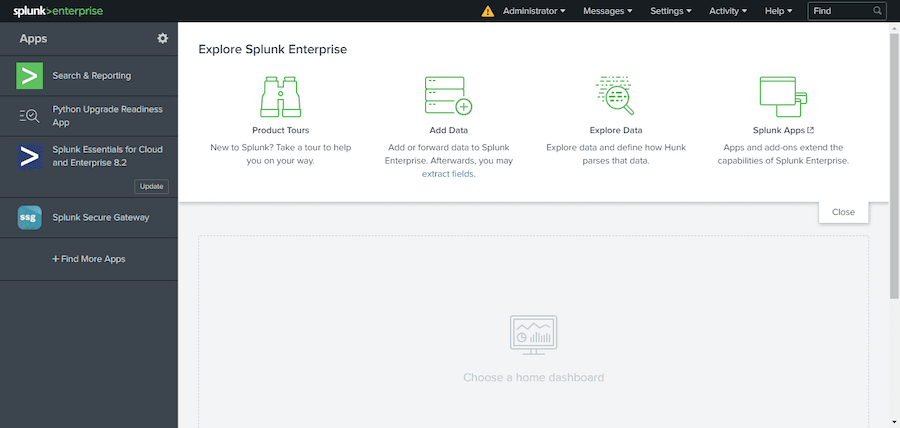
System status verification includes checking service processes, port listeners, and log files for error messages:
sudo systemctl status Splunkd.service
sudo netstat -tulpn | grep :8000
tail -f /opt/splunk/var/log/splunk/splunkd.log
Process monitoring ensures all Splunk components operate correctly. Multiple processes support different functionality including indexing, searching, and web services.
Post-Installation Configuration
Security Hardening
TLS certificate configuration protects web interface communications and API access from network eavesdropping. Generate or install valid SSL certificates for production deployments rather than relying on self-signed certificates.
sudo -u splunk /opt/splunk/bin/splunk set web-cert /opt/splunk/etc/certs/mycert.pem
sudo -u splunk /opt/splunk/bin/splunk set web-privkey /opt/splunk/etc/certs/myprivkey.key
Certificate validation enforcement prevents man-in-the-middle attacks and ensures client authenticity. Configure hostname validation and certificate authority verification for maximum security.
Authentication system integration connects Splunk with enterprise directory services like Active Directory or LDAP. This integration provides centralized user management and single sign-on capabilities for improved user experience.
Network security implementation includes firewall rules, access control lists, and network segmentation. Restrict administrative access to management networks while allowing necessary data ingestion from monitored systems.
Performance Optimization
Memory allocation tuning optimizes Splunk performance for specific workload patterns. Search memory limits, indexing buffers, and cache sizes require adjustment based on system resources and usage patterns.
# Edit server.conf for memory optimization
sudo -u splunk nano /opt/splunk/etc/system/local/server.conf
Common performance settings include:
[general]
serverName = splunk-server-01
sessionTimeout = 1h

[kvstore]
max_queries_per_batch = 1000
max_rows_per_query = 50000

[diskUsage]
minFreeSpace = 5000
Disk I/O optimization involves configuring appropriate mount options, filesystem choices, and storage allocation strategies. XFS filesystems often provide superior performance for Splunk workloads compared to ext4 alternatives.
Network buffer configuration accommodates high-volume data ingestion scenarios. TCP receive buffers, connection pools, and timeout values require tuning for optimal throughput and reliability.
Common Installation Issues and Troubleshooting
Permission and Ownership Problems
File permission errors frequently occur during installation when proper ownership isn’t maintained throughout the process. Recursive ownership fixes resolve most permission-related issues:
sudo chown -R splunk:splunk /opt/splunk
sudo chmod -R 755 /opt/splunk
sudo chmod -R 600 /opt/splunk/etc/auth
SELinux configuration may interfere with Splunk operations on security-hardened systems. Temporarily disable SELinux for testing or create custom policies for production deployments:
sudo setenforce 0
# Or create custom SELinux policies
sudo setsebool -P httpd_can_network_connect 1
Network and Port Conflicts
Port binding conflicts arise when other services occupy default Splunk ports. Identify conflicting processes and modify Splunk configuration or relocate conflicting services:
sudo netstat -tulpn | grep :8000
sudo lsof -i :8000
Firewall configurations may block necessary network access. Configure appropriate rules for Splunk services:
sudo firewall-cmd --permanent --add-port=8000/tcp
sudo firewall-cmd --permanent --add-port=8089/tcp
sudo firewall-cmd --permanent --add-port=9997/tcp
sudo firewall-cmd --reload
Service Startup Issues
Systemd service failures require detailed log analysis for proper diagnosis. Service logs provide specific error messages and configuration problems:
sudo journalctl -u Splunkd.service -f
sudo systemctl status Splunkd.service -l
Dependency issues may prevent service startup when required libraries or services aren’t available. Verify all dependencies and install missing components:
ldd /opt/splunk/bin/splunk
rpm -qa | grep glibc
License and Authentication Problems
License configuration errors prevent Splunk from starting or limit functionality. Verify license file placement and format:
sudo -u splunk /opt/splunk/bin/splunk list licenses
sudo -u splunk /opt/splunk/bin/splunk show license-usage
Authentication failures may result from password policy violations or user account configuration issues. Reset administrator passwords when necessary:
sudo -u splunk /opt/splunk/bin/splunk edit user admin -password newpassword -auth admin:oldpasswordBest Practices for Production Deployment
Data retention policies balance storage costs with analytical requirements. Configure appropriate retention periods based on compliance requirements and storage capacity:
# Configure index retention
sudo -u splunk vi /opt/splunk/etc/system/local/indexes.conf
Backup procedures protect both configuration and indexed data from loss or corruption. Regular configuration backups enable rapid recovery from system failures:
sudo -u splunk tar czf /backup/splunk-config-$(date +%Y%m%d).tgz /opt/splunk/etcMonitoring and maintenance schedules ensure optimal system performance and availability. Regular log file analysis, disk space monitoring, and performance metric review identify potential issues before they impact operations.
Security update procedures maintain system security while preserving operational continuity. Test security patches in development environments before applying to production systems. Coordinate updates with maintenance windows to minimize service disruption.
Performance monitoring encompasses resource utilization, search performance, and user experience metrics. Establish baseline performance measurements and alerting thresholds for proactive issue resolution.
Next Steps and Advanced Configuration
Data input configuration connects Splunk with log sources, databases, and other data systems. Universal Forwarders provide efficient data collection from remote systems while maintaining centralized management.
Distributed search environments scale Splunk capacity across multiple systems through search head and indexer clustering. This architecture supports large-scale deployments with high availability and load distribution.
Advanced security features include role-based access control, data encryption, and audit logging. These capabilities ensure compliance with regulatory requirements and organizational security policies.
Dashboard and visualization development transforms raw data into actionable insights through custom reports, charts, and real-time monitoring displays. Splunk’s powerful search language enables sophisticated data analysis and correlation.
Integration capabilities extend Splunk functionality through REST APIs, custom applications, and third-party connectors. These integrations enable workflow automation and data sharing with other enterprise systems.
Congratulations! You have successfully installed Splunk. Thanks for using this tutorial for installing Splunk on AlmaLinux OS 10 system. For additional help or useful information, we recommend you check the official Splunk website.