How To Install Zulip on Debian 13

Zulip stands as one of the most powerful open-source team collaboration platforms available today, offering a compelling alternative to proprietary solutions like Slack, Microsoft Teams, and Rocket Chat. This comprehensive guide will walk you through every step of installing Zulip on Debian 13 “Trixie,” ensuring you have a fully functional, self-hosted chat server that provides your organization with complete control over communication data and privacy.
Unlike cloud-hosted solutions that charge per user and store your sensitive communications on third-party servers, self-hosting Zulip on Debian 13 gives you unlimited users, complete customization capabilities, and total data sovereignty. The installation process, while technical, is straightforward when following proper procedures and understanding the underlying system requirements.
Debian 13 provides excellent compatibility with Zulip’s architecture, offering stable package repositories, long-term support, and robust security features that make it an ideal choice for hosting business-critical communication infrastructure. This guide covers everything from initial system preparation through advanced configuration options, ensuring your Zulip deployment is secure, performant, and ready for production use.
Prerequisites and System Requirements
Hardware Specifications
Proper hardware planning ensures optimal Zulip performance across different usage scenarios. For small teams with fewer than 50 active users, a minimum configuration of 2GB RAM and 10GB available disk space will suffice, though 4GB RAM provides better performance headroom for message processing and search operations.
Organizations expecting 100-500 concurrent users should provision servers with at least 4GB RAM and dual-core processors to handle the increased database load and real-time message processing. Large deployments supporting 1000+ users require 8GB RAM, quad-core CPUs, and SSD storage for optimal database performance and search indexing operations.
Zulip supports both x86-64 and aarch64 processor architectures, making it compatible with modern Intel, AMD, and ARM-based server hardware. Systems with less than 5GB total RAM should configure swap space equal to available memory to prevent out-of-memory conditions during peak usage or maintenance operations.
Storage requirements scale with user count and message retention policies, with active deployments typically consuming 100MB-1GB per month per 100 users, depending on file sharing frequency and attachment sizes.
Software Prerequisites
Debian 13 “Trixie” provides full compatibility with current Zulip releases, offering all necessary dependencies through official package repositories. The operating system should be freshly installed with minimal additional software to avoid potential conflicts during the Zulip installation process.
Essential prerequisite packages include curl for downloading installation files, wget for retrieving dependencies, git for version control operations, and build-essential for compiling native extensions. The system also requires Python 3.9 or newer, PostgreSQL 12 or later, and Node.js 16+ for frontend asset compilation.
Domain name configuration requires DNS A records pointing to your server’s public IP address, with optional AAAA records for IPv6 support. SSL certificate provisioning works best with fully qualified domain names that resolve correctly from external networks, enabling automatic Let’s Encrypt certificate generation.
SMTP server credentials are essential for user registration, password resets, and notification delivery. Popular options include Gmail with app-specific passwords, Amazon SES, SendGrid, or self-hosted mail servers with proper SPF, DKIM, and DMARC configuration.
Pre-Installation System Preparation
Initial System Updates
Beginning with a fully updated system prevents dependency conflicts and ensures access to the latest security patches. Connect to your Debian 13 server via SSH and execute system updates using the advanced package tool.
sudo apt update && sudo apt upgrade -yThis command refreshes package repository information and installs all available updates, including security patches and bug fixes. The process typically takes 5-15 minutes depending on the number of pending updates and network connectivity.
Following the update process, install essential build tools and utilities required for Zulip compilation and configuration:
sudo apt install -y curl wget git build-essential software-properties-common apt-transport-https gnupg2 ca-certificatesReboot the system after major kernel updates to ensure all changes take effect and the system runs the latest kernel version with updated security features.
User Account Configuration
Security best practices require running Zulip services under dedicated user accounts rather than root privileges. Create a non-root administrative user with sudo access for managing the installation process and ongoing maintenance tasks.
sudo adduser zulipAdmin
sudo usermod -aG sudo zulipAdmin
Configure SSH key authentication for the administrative user to enhance security and streamline remote access. Generate SSH key pairs on your local machine and copy the public key to the server’s authorized_keys file.
The Zulip installation script automatically creates a dedicated ‘zulip’ system user for running server processes, ensuring proper privilege separation and enhanced security through restricted system access.
Firewall Configuration
Debian 13 includes the Uncomplicated Firewall (UFW) for straightforward network security management. Configure firewall rules before installing Zulip to prevent access issues during the setup process.
sudo ufw allow OpenSSH
sudo ufw allow 80/tcp
sudo ufw allow 443/tcp
sudo ufw enable
These rules permit SSH access for remote administration, HTTP traffic for initial setup and Let’s Encrypt certificate validation, and HTTPS traffic for secure Zulip access. Additional ports may be required for specific integrations or monitoring tools.
Verify firewall status and confirm all necessary rules are active:
sudo ufw status verboseThe output should display active rules for SSH (22), HTTP (80), and HTTPS (443) with appropriate allow policies for both IPv4 and IPv6 traffic.
Downloading and Preparing Zulip Installation
Creating Temporary Directory
Proper file organization during installation prevents conflicts and simplifies cleanup procedures. Create a secure temporary directory using the mktemp command, which generates unique directory names with appropriate permissions.
cd $(mktemp -d)This command creates a temporary directory in /tmp with restrictive permissions and changes the current working directory to the new location. The directory name includes random characters to prevent conflicts with concurrent installations or other processes.
Downloading Zulip Server Package
Zulip releases are distributed as compressed tar archives containing all necessary installation scripts, configuration templates, and documentation. Download the latest stable release using curl with appropriate options for reliable transfer.
curl -fLO https://download.zulip.com/server/zulip-server-latest.tar.gzThe -f flag ensures curl fails silently on server errors, -L follows redirects to the actual download location, and -O saves the file with its original name. Download verification using GPG signatures is available for high-security environments requiring cryptographic validation.
Monitor download progress for large files, and verify the completed download is approximately 100-200MB depending on the current Zulip version and included dependencies.
Extracting Installation Files
Extract the downloaded archive using tar with verbose output to monitor the extraction process and identify any potential issues:
tar -xvf zulip-server-latest.tar.gzThe extraction creates a directory named zulip-server-[version] containing installation scripts, configuration templates, documentation, and all necessary files for server deployment. Navigate into the extracted directory to access installation scripts:
cd zulip-server-*Review the contents to familiarize yourself with available scripts and documentation files, including README.md for installation overview and scripts/setup/install for the main installation script.
Zulip Installation Process
Understanding Installation Script Options
The Zulip installation script provides numerous configuration options to customize the deployment according to specific requirements and security policies. Key parameters control SSL certificate generation, email configuration, hostname settings, and optional features.
SSL certificate options include –certbot for automatic Let’s Encrypt certificate generation, –self-signed-cert for testing environments, or –existing-cert for pre-provisioned certificates. Let’s Encrypt integration requires valid DNS resolution and accessible HTTP endpoints for domain validation.
Email configuration affects user registration, password recovery, and notification delivery. The –email parameter specifies the administrative contact for Let’s Encrypt certificate generation and system notifications.
Hostname specification through –hostname ensures proper URL generation, email formatting, and SSL certificate subject alternative names. Use fully qualified domain names that resolve correctly from both internal networks and external internet connections.
Push notification support requires –no-push-notifications for completely self-contained deployments or default settings for mobile app integration through Zulip’s notification servers.
Running the Installation Script
Execute the installation script with appropriate parameters for your deployment scenario. Replace placeholder values with actual domain names and email addresses:
sudo ./scripts/setup/install --certbot --email=admin@yourdomain.com --hostname=chat.yourdomain.comThe installation process typically requires 15-30 minutes depending on server specifications and internet connectivity. The script performs numerous operations including dependency installation, database configuration, SSL certificate generation, and service initialization.
Monitor the installation output for error messages or warnings that might indicate configuration issues. Common problems include DNS resolution failures, firewall blocking, or insufficient system resources for compilation processes.
The script automatically handles PostgreSQL database creation, Nginx web server configuration, Redis and RabbitMQ message queue setup, and systemd service registration for automatic startup management.
Installation Completion and Initial URL
Upon successful completion, the installation script displays a unique URL for initial organization setup and administrative access. This URL includes a secure token for first-time configuration and should be accessed immediately to prevent unauthorized setup.
Installation complete!

To finish setting up Zulip, open your browser to https://chat.yourdomain.com
The installation process creates comprehensive log files in /var/log/zulip/ for troubleshooting and monitoring purposes. System service status can be verified using systemctl commands for individual Zulip components.
Verify that all essential services are running correctly:
sudo systemctl status zulipPost-Installation Configuration
Initial Organization Setup
Access the Zulip web interface using the URL provided during installation to begin organization configuration and administrative account creation. The initial setup wizard guides you through essential configuration steps including organization naming, administrator credentials, and basic policy settings.
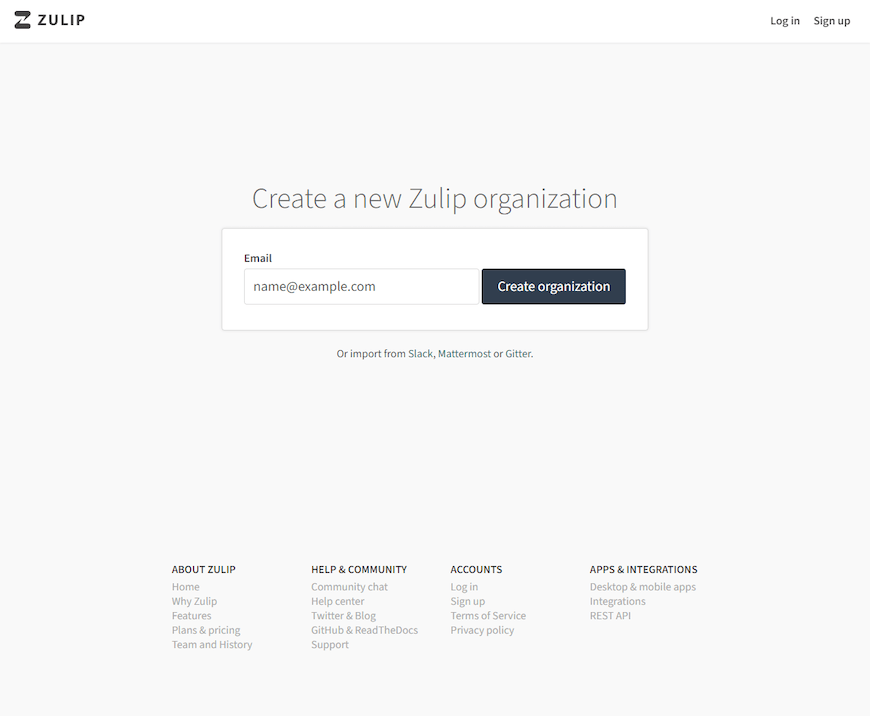
Organization setup requires specifying the organization name, description, and default language settings that affect all future user registrations and system-generated communications. Choose descriptive names that clearly identify your organization to users and external integrations.
Create the first administrative account with a strong password and valid email address for receiving system notifications and password recovery communications. This account has full administrative privileges including user management, integration configuration, and system policy controls.
Configure initial user registration policies, determining whether new users can self-register, require administrator approval, or register only through invitation links. These settings can be modified later through administrative interfaces.
SMTP Configuration for Email Services
Email functionality is essential for user registration, password resets, and notification delivery. Configure SMTP settings by editing the Zulip configuration file located at /etc/zulip/settings.py.
sudo nano /etc/zulip/settings.pyAdd SMTP configuration parameters appropriate for your email provider:
EMAIL_HOST = 'smtp.gmail.com'
EMAIL_HOST_USER = 'zulip@yourdomain.com'
EMAIL_HOST_PASSWORD = 'your-app-password'
EMAIL_PORT = 587
EMAIL_USE_TLS = True
DEFAULT_FROM_EMAIL = 'Zulip Chat <zulip@yourdomain.com>'
Gmail users should generate app-specific passwords rather than using primary account credentials. Commercial email services like SendGrid, Mailgun, or Amazon SES provide dedicated transactional email capabilities with better delivery rates and monitoring tools.
Test email configuration using the Zulip management command:
sudo -u zulip /home/zulip/deployments/current/manage.py send_test_email admin@yourdomain.comSuccessful email delivery confirms proper SMTP configuration and network connectivity to mail servers.
SSL Certificate Configuration
Let’s Encrypt certificates require periodic renewal to maintain SSL functionality. Zulip installations with –certbot automatically configure renewal through cron jobs, but manual verification ensures proper operation.
Check certificate status and expiration dates:
sudo certbot certificatesTest automatic renewal processes:
sudo certbot renew --dry-runManual certificate renewal may be necessary if automatic processes fail due to DNS changes, firewall modifications, or service interruptions:
sudo certbot renew --force-renewalConfigure HTTP to HTTPS redirection in Nginx to ensure all traffic uses encrypted connections. The installation script typically configures this automatically, but custom configurations may require manual adjustment.
Performance Optimization and Security Hardening
System Performance Tuning
Database performance significantly impacts Zulip responsiveness and user experience. PostgreSQL configuration optimization involves adjusting memory allocation, connection limits, and query optimization parameters based on expected user load and available system resources.
Edit PostgreSQL configuration files to optimize for Zulip workloads:
sudo nano /etc/postgresql/13/main/postgresql.confRecommended settings for systems with 4GB RAM:
shared_buffers = 1GB
effective_cache_size = 3GB
maintenance_work_mem = 256MB
checkpoint_completion_target = 0.9
wal_buffers = 16MB
default_statistics_target = 100
random_page_cost = 1.1
effective_io_concurrency = 200
Redis cache configuration affects real-time message delivery and session management performance. Adjust Redis memory limits and persistence settings based on usage patterns and system capacity.
Monitor system resource utilization using tools like htop, iotop, and PostgreSQL’s pg_stat_activity view to identify performance bottlenecks and optimization opportunities.
Security Best Practices
Implement comprehensive security measures including regular system updates, intrusion detection, log monitoring, and access controls. Configure automatic security updates for critical system components while maintaining manual control over Zulip-specific updates.
Enable fail2ban for automated intrusion prevention:
sudo apt install fail2ban
sudo systemctl enable fail2ban
Configure log rotation to prevent disk space exhaustion:
sudo nano /etc/logrotate.d/zulipImplement database backup procedures with encrypted offsite storage:
sudo -u zulip /home/zulip/deployments/current/scripts/setup/postgres-init-db --create-backupRegular security audits should include SSL certificate validation, user access reviews, integration security assessments, and system vulnerability scanning using tools like nmap and OpenVAS.
Testing and Verification
Functional Testing
Comprehensive testing ensures all Zulip features operate correctly before production deployment. Create test user accounts to verify registration processes, email delivery, and basic messaging functionality.
Test user registration workflows including email verification, password policies, and account activation procedures. Verify that notification systems deliver messages appropriately through web interfaces, email, and mobile applications.
Create test channels and topics to verify message threading, search functionality, file uploads, and emoji reactions. Test integration capabilities with common tools like GitHub, Jira, or custom webhooks to ensure external service connectivity.
Perform administrative functions including user management, organization settings modification, and system configuration changes to verify administrative interface functionality.
Performance Verification
Load testing helps identify performance limits and optimization requirements before production deployment. Use tools like Apache Bench or siege to simulate concurrent user loads and measure system response times.
Monitor database performance during load testing using PostgreSQL’s built-in monitoring views and external tools like pgAdmin or DataDog. Identify slow queries and optimize indexes for frequently accessed data.
Network connectivity testing ensures reliable access from various client types and network conditions. Test connections from different geographic locations, mobile networks, and corporate firewalls to identify potential access issues.
Benchmark message delivery latency and search query performance under realistic usage scenarios to establish performance baselines for ongoing monitoring and capacity planning.
Troubleshooting Common Installation Issues
Installation Script Failures
Dependency resolution problems typically occur when package repositories are outdated or when conflicting software packages are already installed. Update package repositories and remove conflicting packages before retrying installation.
Network connectivity issues during download phases can be resolved by verifying DNS resolution, checking firewall settings, and ensuring adequate bandwidth for downloading large packages. Consider using local package mirrors for improved reliability.
Permission-related installation failures often result from incorrect user privileges or SELinux policies. Verify that the installation user has sudo access and that security policies permit necessary system modifications.
Insufficient system resources can cause compilation failures or database initialization problems. Monitor system memory and disk usage during installation, and upgrade hardware specifications if necessary.
Post-Installation Problems
Web interface accessibility issues frequently result from firewall misconfiguration, DNS resolution problems, or SSL certificate failures. Verify that appropriate ports are open and that DNS records point to the correct server IP address.
Email configuration problems prevent user registration and notification delivery. Test SMTP connectivity manually using telnet or dedicated email testing tools to verify server configuration and authentication credentials.
SSL certificate issues can prevent secure connections and cause browser warnings. Verify certificate installation, check domain name matching, and ensure certificate chains are complete and properly ordered.
Database connection errors typically indicate PostgreSQL configuration problems, insufficient disk space, or memory allocation issues. Review PostgreSQL logs and verify database service status using systemctl commands.
Maintenance and Updates
Regular Maintenance Tasks
System maintenance ensures optimal performance, security, and reliability over time. Implement scheduled maintenance windows for system updates, database optimization, and log cleanup procedures.
Zulip updates should be tested in staging environments before production deployment. The update process typically involves downloading new releases, backing up existing configurations, and running upgrade scripts.
sudo -u zulip /home/zulip/deployments/current/scripts/upgrade-zulip zulip-server-latest.tar.gzDatabase maintenance includes routine tasks like vacuuming, reindexing, and analyzing query performance to maintain optimal database performance as data volume grows.
Log rotation and cleanup prevent disk space exhaustion while preserving sufficient historical data for troubleshooting and compliance requirements.
Backup and Recovery
Implement comprehensive backup strategies covering database content, configuration files, uploaded attachments, and SSL certificates. Automated backup scripts should run during low-usage periods and store data in secure, offsite locations.
sudo -u zulip /home/zulip/deployments/current/manage.py backup --output=/backup/zulip-backup-$(date +%Y%m%d).tar.gzRecovery procedures should be documented and tested regularly to ensure rapid restoration capabilities during emergency situations. Test recovery processes using separate systems to verify backup integrity and procedure accuracy.
Data retention policies should balance storage costs with compliance requirements and operational needs. Configure automatic deletion of old messages, attachments, and log files according to organizational policies.
Advanced Configuration Options
Integrations and Plugins
Zulip’s extensive integration ecosystem supports over 90 third-party services including development tools, project management systems, and monitoring platforms. Popular integrations include GitHub for code repository notifications, Jira for issue tracking, and Stripe for payment processing alerts.
Configure webhooks for custom integrations by creating incoming webhook URLs in the Zulip administration interface and configuring external services to deliver notifications to these endpoints.
API access enables custom applications and automation scripts to interact with Zulip programmatically. Generate API keys for service accounts and implement appropriate rate limiting and authentication mechanisms.
Bot integrations provide automated responses, scheduled messages, and interactive features that enhance team productivity and engagement.
Multi-Server Deployment
High-availability deployments require multiple server instances with load balancing and database replication. Configure PostgreSQL streaming replication for database redundancy and implement Redis clustering for session management.
Load balancing distributes user connections across multiple Zulip application servers using tools like HAProxy or Nginx upstream configurations. Implement health checks to automatically remove failed servers from rotation.
Database clustering provides read scaling and failover capabilities through PostgreSQL’s built-in replication features or external solutions like Patroni for automated failover management.
Geographic distribution reduces latency for global teams through strategically placed server instances and content delivery network integration for static asset delivery.
Congratulations! You have successfully installed Zulip. Thanks for using this tutorial for installing the Zulip open source chat and collaborative software on Debian 13 “Trixie” system. For additional help or useful information, we recommend you check the official Zulip website.