How To Install RawTherapee on Fedora 43

If you shoot raw files and run Fedora 43, you need a serious raw processor. RawTherapee is one of the best free, open-source raw image editors available on Linux, and installing it on Fedora 43 is straightforward once you know which method fits your workflow. This guide covers five installation methods: DNF (the official Fedora repository), Flatpak via Flathub, AppImage, Snap, and building from source, each with exact commands, expected outputs, and troubleshooting steps. Whether you are a photographer, developer, or sysadmin setting up a creative workstation, this guide gets you from zero to a working RawTherapee setup on Fedora 43 in under ten minutes.
What Is RawTherapee and Why Use It on Fedora 43?
RawTherapee is a free, open-source, cross-platform raw image processing application released under the GNU GPL v3 license. It processes the unprocessed sensor data from digital cameras (formats like CR2, NEF, DNG, ARW, ORF, and over 300 others) rather than working with compressed JPEGs, giving photographers full control over every tonal and color decision before exporting a final image.
Fedora 43 ships RawTherapee 5.12-5.fc43 in its official updates repository, built on November 1, 2025 by the Fedora Project maintainers. That means you get a distribution-tested build with no third-party repository needed for the default install path.
Fedora 43 also introduced full Wayland-only sessions and upgraded package signing to RPM 6.0 with OpenPGP v6 support, making official repository packages like RawTherapee cryptographically verified and safer than downloading random binaries from the web.
Key Features of RawTherapee
- Non-destructive editing: your original raw file is never modified, changes are saved as sidecar files
- Advanced noise reduction using wavelets and non-local means algorithms
- Lens distortion and chromatic aberration correction via the Lensfun database
- Full color management with LCMS2 and ICC profile support
- Exposure, tone curves, highlight/shadow recovery, and local editing
- Batch processing via the
rawtherapee-clicommand-line interface - JPEG XL (JXL) read support in 5.12 builds
- GTK3-based GUI, compatible with Fedora 43 Wayland sessions
- Free and completely open source (no license fees, no feature paywalls)
Prerequisites for This Fedora 43 Installation Guide
Before running any command in this guide, confirm you have the following in place:
- Operating system: Fedora 43 Workstation, KDE Spin, or any Fedora 43 variant with a working terminal
- User privileges: A non-root user account with
sudoaccess. Never install packages as root directly. - Internet connection: Required for downloading packages from the Fedora repository or Flathub
- Terminal emulator: GNOME Terminal, Konsole, Alacritty, or any terminal of your choice
- Disk space: Approximately 60–100 MB for the DNF install; 300–600 MB for Flatpak (includes runtime); 2+ GB for a source build
- System state: Run a full system update first to avoid metadata conflicts (covered in Step 1 below)
Step 1: Update Your Fedora 43 System Before Installation
Before installing any new software on Fedora 43, refresh your package metadata and apply pending updates. Skipping this step is the single most common reason installations fail with “no match for argument” or dependency conflict errors.
Open your terminal and run:
sudo dnf upgrade --refreshThe --refresh flag forces DNF5 to download fresh repository metadata rather than relying on a cached (and potentially stale) copy. DNF5 is the default package manager in Fedora 43, replacing DNF4.
Expected output:
Last metadata expiration check: 0:00:01 ago on Sat 04 Apr 2026.
Dependencies resolved.
Nothing to do.
Complete!
If updates are available, DNF5 lists them and asks for confirmation. Type y and press Enter to proceed. Wait for the update to complete before moving to the next step.
Step 2: Install RawTherapee via DNF (Recommended Method)
The DNF method is the fastest, most reliable way to install RawTherapee on Fedora 43. It pulls the package directly from Fedora’s official repository, resolves all library dependencies automatically, and integrates with your system’s update mechanism so future updates arrive with dnf upgrade.
Install RawTherapee with a Single Command
sudo dnf install rawtherapeeDNF5 resolves and installs all required dependencies automatically, including:
lensfun(lens correction database)lcms2(color management)fftw3(fast Fourier transforms for noise reduction)libtiff,libjpeg-turbo(image format support)librsvg2(SVG rendering for the GUI)
Expected output:
Dependencies resolved.
========================================================
 Package            Arch    Version         Repository  Size
========================================================
Installing:
 rawtherapee        x86_64  5.12-5.fc43     updates     28 M

Transaction Summary
========================================================
Install  1 Package (+12 dependencies)

Total download size: 31 M
Installed size: 87 M
Is this ok [y/N]: y
Type y and press Enter. The download and install process typically finishes in under a minute on broadband.
Verify the Installation
After installation completes, confirm the binary is on your PATH and check the installed version:
rawtherapee --versionExpected output:
RawTherapee, version 5.12For full package metadata including build date and dependencies:
rpm -qi rawtherapeeThis confirms the package is version 5.12-5.fc43, built by the Fedora Project, with all file checksums intact.
Step 3: Install RawTherapee via Flatpak on Fedora 43 Setup
The Flatpak method installs RawTherapee in a sandboxed container isolated from your system libraries. Use this method when you want to run a specific upstream version independently of the system RPM, or when you manage multiple Fedora versions on different machines.
Enable the Flathub Repository
Flatpak comes pre-installed on Fedora 43 Workstation. You only need to enable the Flathub remote if you have not done so already.
flatpak remote-add --if-not-exists flathub https://dl.flathub.org/repo/flathub.flatpakrepoThe --if-not-exists flag prevents an error if Flathub is already configured on your system.
Install RawTherapee from Flathub
flatpak install flathub com.rawtherapee.RawTherapeeFlatpak downloads the application and its required runtime (GNOME Platform or compatible runtime). On a first-time Flatpak install, the runtime download can add several hundred megabytes. Confirm any prompts with y.
Expected output:
Looking for matches...
Required runtime for com.rawtherapee.RawTherapee/x86_64/stable (runtime/org.gnome.Platform/...)
 not installed.
Do you want to install it? [y/n]: y
Launch RawTherapee via Flatpak
flatpak run com.rawtherapee.RawTherapeeYou can also find RawTherapee in the GNOME Activities overview or app grid after logging out and back in. The app icon registers only on session start.
Grant Access to External Drives (Important)
The Flatpak sandbox restricts file access to your home directory and /tmp by default. If you store raw files on an external drive or a separate partition, grant explicit access:
flatpak --user override --filesystem=/mnt/photos com.rawtherapee.RawTherapeeReplace /mnt/photos with your actual drive mount path. For a GUI approach, install Flatseal from Flathub and manage all Flatpak permissions visually.
Step 4: Install RawTherapee via AppImage (Portable, No Install Required)
The AppImage method gives you a fully portable, self-contained RawTherapee executable. No root privileges needed, no package manager, and deleting the file completely removes the application. This method works well for testing a new version before committing to a system-level install.
Download the AppImage
Visit the official RawTherapee downloads page at rawtherapee.com/downloads/ and download the Linux 64-bit AppImage for version 5.12. Alternatively, use wget in the terminal:
wget https://rawtherapee.com/downloads/5.12/RawTherapee_5.12_release.AppImageMake the AppImage Executable
chmod u+x RawTherapee_5.12_release.AppImageThe u+x flag grants execute permission to your user only, not to other users on the system.
Run the AppImage
./RawTherapee_5.12_release.AppImageRawTherapee launches immediately. The AppImage mounts a virtual internal filesystem (FUSE) to serve its bundled libraries, so no installation step occurs.
Limitation: AppImages do not integrate with DNF or Flatpak update mechanisms. You must manually download new versions from the official site. They also do not automatically appear in the GNOME app launcher without a third-party tool like AppImageLauncher.
Step 5: Install RawTherapee via Snap on Fedora 43
Snap is a universal package format from Canonical. While Flatpak is the native universal format on Fedora and better integrated with GNOME Software, Snap works fine if you already use it on other machines or prefer it.
Install and Enable Snapd
sudo dnf install snapdAfter installation, create the required symbolic link so Snap packages can be found system-wide:
sudo ln -s /var/lib/snapd/snap /snapLog out and back in (or reboot) to register the Snap paths in your shell environment.
Install RawTherapee via Snap
sudo snap install rawtherapeeLaunch the Snap Version
rawtherapeeThe binary is placed on your PATH automatically by snapd.
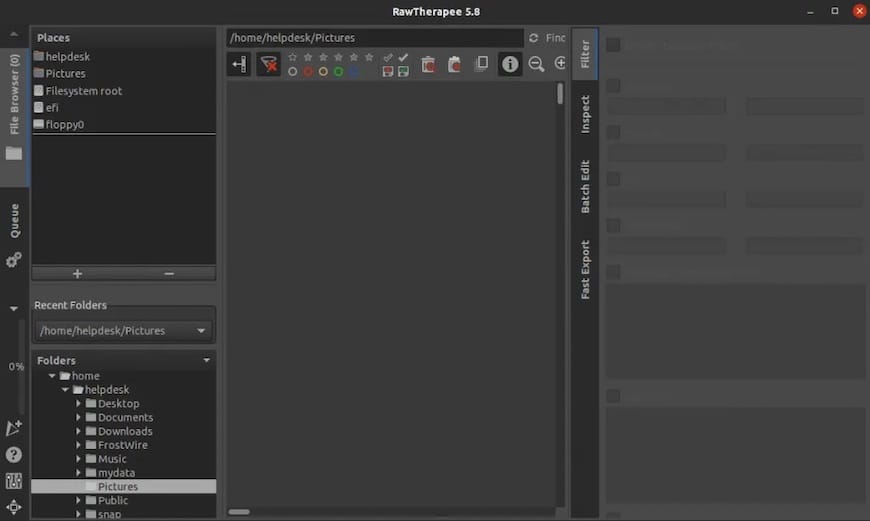
Step 6: Build RawTherapee from Source on Fedora 43
Building from source gives you the absolute latest development build, native CPU optimizations, and the ability to apply custom compile flags. This is the path for developers, testers, or users who need a feature not yet in the stable 5.12 release.
Install Build Dependencies
sudo dnf install git make cmake curl gcc gcc-c++ gtk3-devel \
  exiv2-devel gtkmm30-devel lensfun-devel librsvg2-devel \
  lcms2-devel fftw-devel expat-devel libiptcdata-devel \
  libtiff-devel libjpeg-turbo-devel libcanberra-devel libatomic
Clone the Repository
git clone https://github.com/Beep6581/RawTherapee ~/programs/code-rawtherapeeFor the latest stable tagged release, add --branch 5.12:
git clone --branch 5.12 https://github.com/Beep6581/RawTherapee ~/programs/code-rawtherapeeRun the Automatic Build Script
The official build script auto-detects your CPU, applies native optimizations, and handles the CMake configuration for you. Do not run it as root.
cd ~/programs/code-rawtherapee
chmod +x tools/build-rawtherapee
./tools/build-rawtherapee
The build process takes 10–30 minutes depending on your CPU core count and available RAM.
Run the Compiled Binary
~/programs/rawtherapee/rawtherapeeFor batch processing with the command-line interface:
~/programs/rawtherapee/rawtherapee-cli --helpHow to Launch RawTherapee on Fedora 43
Once installed by any method, here is how to open the application:
| Method | Terminal Command | GUI Launch |
|---|---|---|
| DNF | rawtherapee |
GNOME Activities search |
| Flatpak | flatpak run com.rawtherapee.RawTherapee |
App grid (after session restart) |
| AppImage | ./RawTherapee_5.12_release.AppImage |
File manager double-click |
| Snap | rawtherapee |
GNOME Activities search |
| Source build | ~/programs/rawtherapee/rawtherapee |
None by default |
How to Update RawTherapee on Fedora 43
- DNF:
sudo dnf upgrade rawtherapee - Flatpak:
flatpak update com.rawtherapee.RawTherapee - Snap:
sudo snap refresh rawtherapee - AppImage: Download the new
.AppImagefile manually fromrawtherapee.com/downloads/and replace the old file. - Source build:
cd ~/programs/code-rawtherapee && git pull, then re-run./tools/build-rawtherapee.
How to Uninstall RawTherapee from Fedora 43
- DNF:
sudo dnf remove rawtherapeethensudo dnf autoremoveto clear orphaned dependencies. - Flatpak:
flatpak uninstall com.rawtherapee.RawTherapee - Snap:
sudo snap remove rawtherapee - AppImage: Delete the
.AppImagefile. No traces remain on the system. - Source build:
rm -rf ~/programs/rawtherapee ~/programs/code-rawtherapee
Troubleshooting Common RawTherapee Installation Issues on Fedora 43
Even on a clean system, things can go sideways. Here are the five most common errors and exactly how to fix them.
Error 1: “No match for argument: rawtherapee”
Cause: DNF5 is working from stale cached metadata and cannot find the package in its local index.
Fix:
sudo dnf upgrade --refresh
sudo dnf install rawtherapee
Error 2: Flatpak App Icon Does Not Appear After Install
Cause: The GNOME shell application launcher only indexes new apps on session start.
Fix: Log out of your GNOME session and log back in. The RawTherapee icon will appear in the Activities overview and app grid.
Error 3: Flatpak Cannot Open Raw Files on an External Drive
Cause: Flatpak’s sandbox blocks filesystem access outside the home directory by default.
Fix:
flatpak --user override --filesystem=/mnt/your-drive com.rawtherapee.RawTherapeeReplace /mnt/your-drive with the actual mount point. Run lsblk to identify your drive’s mount point if you are unsure.
Error 4: AppImage Fails to Execute
Cause: The file lacks execute permission, or the system is missing FUSE (required for AppImage mounting).
Fix:
chmod u+x RawTherapee_5.12_release.AppImage
sudo dnf install fuse fuse-libs
./RawTherapee_5.12_release.AppImage
Also confirm your system is x86_64 with uname -m. AppImages from the official site are compiled for 64-bit x86 only.
Error 5: Source Build Fails with CMake “Could not find” Error
Cause: One or more build dependency headers are missing from the system.
Fix:
sudo dnf install git make cmake curl gcc gcc-c++ gtk3-devel \
  exiv2-devel gtkmm30-devel lensfun-devel librsvg2-devel \
  lcms2-devel fftw-devel expat-devel libiptcdata-devel \
  libtiff-devel libjpeg-turbo-devel libcanberra-devel libatomic
After installing all dependencies, delete the build folder inside your clone directory and re-run the build script from scratch.
Congratulations! You have successfully installed RawTherapee. Thanks for using this tutorial for installing RawTherapee on your Fedora 43 system. For additional help or useful information, we recommend you check the official RawTherapee website.