
If you’ve spent any real time administering Fedora workstations, you already know that “just install the package” rarely tells the whole story. Amarok is one of those applications where the packaging landscape has shifted enough over the years that following a five-year-old blog post will leave you with a broken audio backend or a database error nobody bothers explaining. This guide walks through the actual, current path to getting Amarok running cleanly on Fedora 44, including the codec licensing quirks that trip up nearly every new Fedora user and the configuration details that matter once you move past a stock install.
Amarok has carried a loyal following since the mid-2000s, largely because it treats a local music collection like a database rather than a flat file browser. Smart playlists, dynamic collections, cover art fetching, lyrics integration, and scriptable extensions still make it one of the more capable open-source music managers available on Linux, even with newer competitors like Elisa and Strawberry chipping away at its user base. The catch on Fedora specifically is that Amarok’s packaging status has been inconsistent for years, oscillating between “actively maintained in the official repos” and “deprecated, use Flatpak instead.”
This matters more than it sounds. Fedora’s relationship with proprietary and patent-encumbered codecs means a fresh Amarok install often plays silence when you double-click an MP3, and the fix isn’t obvious unless you already know about RPM Fusion. On top of that, Fedora 44 ships with newer Qt and KDE Frameworks versions than the last officially packaged Amarok build, which is exactly why the KDE project moved distribution to Flatpak as the primary channel. Understanding why these gaps exist—not just copying commands—will save you a support ticket down the line, whether you’re setting this up on a personal workstation or a shared media server in a small office.
This walkthrough covers both installation paths available on Fedora 44: the DNF/RPM route for users who prefer native packages, and the Flatpak route, which is currently the more reliable and up-to-date option. It also covers MP3/codec licensing, MySQL backend configuration for larger libraries, common failure modes, and the security and performance considerations that actually matter in production or multi-user environments.
Why Amarok’s Packaging Situation on Fedora Is Complicated
Fedora has a strict policy against shipping patent-encumbered or non-free codecs directly in its base repositories. That’s a deliberate legal decision, not an oversight, and it’s the single biggest reason new Amarok installs feel “broken” out of the box. MP3 playback, in particular, depends on codec packages Fedora won’t ship natively, which means every fresh install needs a follow-up step through RPM Fusion.
The second complication is more recent. Amarok’s last major KDE4/KDE5-based releases stagnated for years while Qt6/KF6 development quietly continued upstream, culminating in the Amarok 3.3 release with a full Qt6/KF6 port and modernized GStreamer integration in mid-2025. Fedora’s official repositories still tend to lag behind this on native RPM packaging, and several Fedora Discussion threads flag the native amarok package as feeling stale or deprecated compared to what’s available elsewhere. Flatpak has effectively become the path of least resistance for getting a current build.
Prerequisites Before You Start
Before touching a package manager, confirm the basics. This sounds trivial, but skipping it is how you end up debugging a phantom “package not found” error that’s really a stale metadata cache.
- Confirm you’re running Fedora 44 with
cat /etc/fedora-release - Ensure your system is fully updated with
sudo dnf upgrade --refresh - Confirm you have either GNOME or KDE Plasma installed, since Amarok pulls in KDE Frameworks dependencies regardless of desktop environment
- Check available disk space—Amarok’s local collection database and cover art cache can grow substantially with large libraries
- Have sudo/root access ready, since both RPM and RPM Fusion setup require elevated privileges
Method 1: Installing Amarok via DNF (Native Package)
This is the traditional route, and it still works on Fedora 44, though be aware the version delivered here may trail behind the latest upstream release.
Step 1: Update Your System
sudo dnf upgrade --refreshNever skip this. Installing on top of stale metadata is one of the most common causes of dependency resolution failures that look like package bugs but aren’t.
Step 2: Install Amarok
sudo dnf install amarokDNF will resolve the KDE Frameworks and Qt dependencies automatically. On a minimal Fedora install (especially server-oriented setups or GNOME-only workstations), expect this to pull in a noticeable chunk of KDE libraries even if you’re not running Plasma as your desktop.
Step 3: Install a Playback Backend
Amarok relies on Phonon as its audio abstraction layer, and Phonon needs a working backend to actually produce sound. GStreamer is the default and generally the safer choice on Fedora:
sudo dnf install phonon-backend-gstreamerIf you want VLC’s backend as an alternative (useful when GStreamer misbehaves with certain container formats):
sudo dnf install phonon-backend-vlcHaving both installed isn’t a bad idea on a workstation you expect to use for years—if one backend regresses after an update, switching inside Amarok’s settings is a two-click fix instead of a package hunt.
Method 2: Installing Amarok via Flatpak (Recommended for Current Versions)
If you want the actively maintained, current build with the Qt6/KF6 port, Flatpak is the more dependable path on Fedora 44 right now.
Step 1: Confirm Flatpak Is Enabled
Fedora ships with Flatpak support and the Fedora Flatpak remote enabled by default, but it’s worth confirming:
flatpak remotesIf you don’t see fedora or flathub listed, add Flathub explicitly:
sudo flatpak remote-add --if-not-exists flathub https://flathub.org/repo/flathub.flatpakrepoStep 2: Search for Amarok
flatpak search amarokYou should see org.kde.amarok listed, potentially from both the Fedora remote and Flathub. Which one you install from matters less than making sure you’re pulling from a remote you trust and keep updated.
Step 3: Install It
flatpak install flathub org.kde.amarokOr, if pulling from Fedora’s own Flatpak remote:
flatpak install fedora org.kde.amarokStep 4: Run Amarok
flatpak run org.kde.amarokIt’ll also show up in your application launcher under the normal KDE icon, no different from a native install visually.
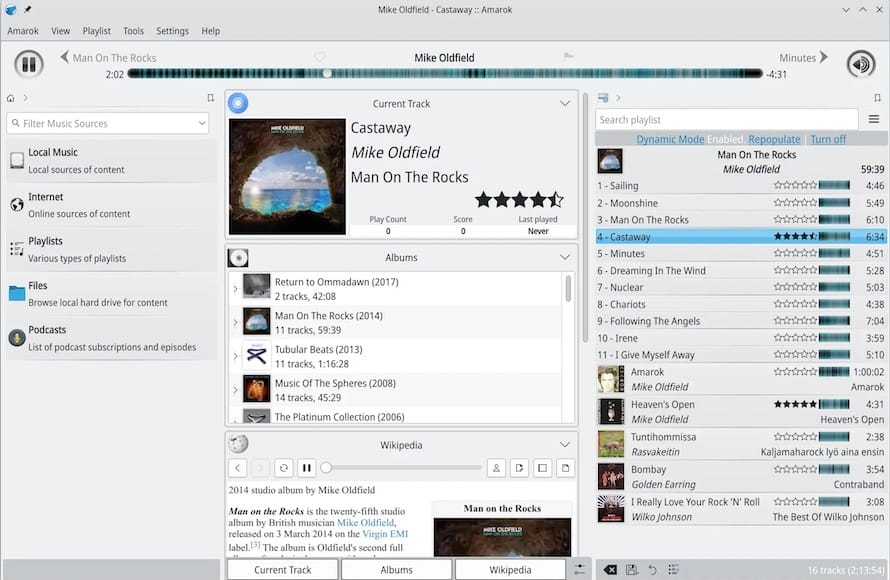
Step 5: Configure Sandbox Permissions with Flatseal
This is the step most tutorials skip, and it’s the one that actually determines whether Amarok can see your music at all. Flatpak sandboxes applications by default, meaning Amarok won’t have access to arbitrary filesystem locations unless you grant it.
flatpak install flathub com.github.tchx84.FlatsealLaunch Flatseal, select Amarok from the list, and review the filesystem permissions. If your music library lives on an external drive or a non-standard mount point, you’ll need to manually add that path under Filesystem access—Amarok’s default permissions typically only cover standard home directory locations like Music and Downloads. This is exactly the kind of detail that makes people assume Flatpak apps are “buggy” when the reality is just an unset permission.
Enabling MP3 and Proprietary Codec Support
This is the step that generates the most confusion, and it applies whether you installed via DNF or Flatpak. Fedora deliberately omits MP3 decoding support from its base system for licensing reasons.
Step 1: Enable RPM Fusion
sudo dnf install https://download1.rpmfusion.org/free/fedora/rpmfusion-free-release-$(rpm -E %fedora).noarch.rpm \
https://download1.rpmfusion.org/nonfree/fedora/rpmfusion-nonfree-release-$(rpm -E %fedora).noarch.rpm
This replaces the older yum localinstall syntax you’ll still see referenced in older guides, but the underlying logic hasn’t changed—you’re registering both the free and non-free RPM Fusion repositories against your current Fedora release.
Step 2: Install the Multimedia Group
Fedora’s own documentation now recommends installing the full multimedia group rather than hunting individual packages one at a time:
sudo dnf group install multimediaThis pulls in GStreamer plugins, codec libraries, and related dependencies in one shot.
Step 3: Install GStreamer’s “Ugly” Plugin Set for MP3
If you’re using the GStreamer backend (the default), MP3 decoding specifically comes from the “ugly” plugin package:
sudo dnf install gstreamer1-plugins-uglyOlder documentation references gstreamer-plugins-ugly without the version suffix—Fedora 44 uses GStreamer 1.x exclusively, so the correct package name includes the 1.
Step 4: Restart Amarok and Verify
Close Amarok completely, then relaunch it and try playing an MP3 file from your collection. If audio still doesn’t play, check the backend configuration:
Amarok → Settings → Configure Amarok → Playback → Configure Phonon → Backend tab
Confirm GStreamer (or VLC, if you installed that backend) is selected and prioritized.
Configuring the Music Collection and Database Backend
By default, Amarok uses an embedded SQLite-style database for your collection metadata. That’s fine for a personal library under a few thousand tracks, but it starts to show its limits once you’re managing tens of thousands of files, multiple collections, or running Amarok on a shared machine.
Setting Up an External MySQL/MariaDB Backend
For larger libraries, switching to MySQL noticeably improves scan speed and search responsiveness. This is a genuinely underused optimization—most users never touch it and just live with sluggish collection rescans.
sudo dnf install mariadb-server
sudo systemctl enable --now mariadb
Create a dedicated database and user rather than reusing root credentials:
mysql -u root -p
CREATE DATABASE amarokdb;
CREATE USER 'amarokuser'@'localhost' IDENTIFIED BY 'your-strong-password';
GRANT ALL PRIVILEGES ON amarokdb.* TO 'amarokuser'@'localhost';
FLUSH PRIVILEGES;
EXIT;
Then inside Amarok, go to Settings → Configure Amarok → Database, enable “Use external MySQL database,” and enter the connection details you just created. This one change alone can cut collection rescan times dramatically on libraries with 20,000+ tracks, because you’re offloading indexing to a proper relational database engine instead of a lightweight embedded store.
Point Amarok at your actual music directory under Collection settings, and let the initial scan complete before doing anything else—interrupting a first-time scan on a large library is a common cause of duplicate or missing entries later.
Real-World Use Cases and Edge Cases
A few scenarios come up often enough to be worth calling out specifically.
Network-attached or NFS-mounted music libraries. If your collection lives on a NAS mounted over NFS or Samba, make sure the mount is stable and reliably available at boot before Amarok tries to scan it—an intermittent mount will produce a collection database full of “missing file” errors that are annoying to clean up. Add the mount to /etc/fstab with appropriate timeout options rather than mounting it manually each session.
iPod and portable device syncing. Amarok’s iPod support depends on libgpod, which needs to be installed separately in most cases. On the Flatpak build, you also need to grant filesystem access to the device’s mount point through Flatseal, or Amarok will detect the iPod but report it as uninitialized because it can’t actually read the filesystem.
DAAP shares (iTunes-style network sharing). If you want DAAP shares visible across your local network, you’ll need nss-mdns installed and Avahi running:
sudo dnf install nss-mdns avahi
sudo systemctl enable --now avahi-daemon
Then enable the DAAP Collection plugin inside Amarok’s settings.
Shared or multi-user desktop machines. If multiple accounts on the same Fedora box use Amarok, each user gets their own collection database by default under their home directory. This is usually the correct behavior, but if you’re centralizing a shared music library for a household or small office setup, point the MySQL backend at a shared server instance instead of running separate embedded databases per user.
Troubleshooting Common Amarok Issues on Fedora 44
No Sound / Silent Playback
The most frequent cause is a missing or misconfigured Phonon backend. Verify the backend is installed and selected under Settings → Configure Amarok → Playback → Configure Phonon. If GStreamer is selected but sound still doesn’t work, check that PulseAudio or PipeWire (Fedora 44’s default) is running correctly:
systemctl --user status pipewireMP3 Files Won’t Play Despite RPM Fusion Being Enabled
This usually means the multimedia group install didn’t fully complete, or you’re on the wrong GStreamer plugin package name. Re-run:
sudo dnf group install multimedia
sudo dnf install gstreamer1-plugins-ugly gstreamer1-plugins-bad-freeworld
Flatpak Version Can’t See Music Files
Almost always a sandbox permission issue. Open Flatseal, select Amarok, and check the Filesystem section for the actual path where your music lives—not just the generic “Music folder” toggle, especially if files are on a secondary drive or external mount.
Collection Scan Hangs or Crashes on Large Libraries
Switch to the external MySQL backend described above. The embedded database struggles disproportionately with very large collections, and scan performance improves significantly once the workload moves to MariaDB.
“Package Not Found” Errors During DNF Install
Almost always a stale repo cache. Run:
sudo dnf clean all && sudo dnf makecacheThen retry the install.
Amarok Feels Outdated Compared to Documentation You’ve Read
If you’re following older tutorials referencing Amarok 2.x features that don’t seem to exist, you’re likely running the native Fedora package, which can trail behind upstream. Switch to the Flatpak build for the current Qt6/KF6-based 3.x release.
Performance, Security, and Optimization Considerations
CPU and memory footprint. Amarok’s collection indexing is the heaviest operation you’ll trigger regularly. On a large library, initial scans can spike CPU usage across multiple cores briefly as it reads metadata tags. This is normal and short-lived; if it’s a recurring problem on a resource-constrained machine, consider running the initial scan during off-hours or over an SSH session with nice -n 10 prepended if launching from CLI.
Disk I/O with network storage. If your collection sits on spinning disks or over a slow network mount, cover art fetching and metadata scans will bottleneck on I/O rather than CPU. Local SSD caching of frequently accessed metadata, or simply migrating the collection database to local storage even if the audio files stay remote, resolves most of this.
Firewall considerations for DAAP and network shares. If you enable DAAP sharing or MySQL remote access, don’t leave those ports open to the world. For a local MySQL backend used only by Amarok on the same machine, bind MariaDB to localhost only:
[mysqld]
bind-address = 127.0.0.1
If DAAP is enabled for LAN sharing, restrict it with firewalld rather than opening it broadly:
sudo firewall-cmd --zone=home --add-service=mdns --permanent
sudo firewall-cmd --reload
Flatpak sandbox as a security feature, not just an inconvenience. It’s tempting to grant Amarok blanket filesystem access in Flatseal just to make the permission errors go away. Resist that. Scope access to only the specific directories your music actually lives in—the sandbox model exists precisely to limit what a compromised or buggy application can touch on your system.
Keep RPM Fusion and codec packages updated. Codec packages occasionally receive security patches, particularly around malformed media file handling. Treat dnf upgrade on a regular cadence as non-negotiable, not optional maintenance.